
How to put your boutique online and display products
Set up a boutique online store that sells: how to display sarees, kurtas and jewellery with photos, sizes, fabric details, collections and new drops.
caart team · · Updated · 4 min read
Key points
- Customers buy clothes and jewellery by looking. Photos come first, then size, fabric and price.
- Show several photos per piece: front, back, detail and one worn or styled.
- Make sizes and colours options on one product, not separate posts.
- Group pieces into collections, and announce new drops in one place.
Boutiques sell on detail: the weave of a saree, the fall of a kurta, the finish of a pair of jhumkas. Online, the customer can't touch the fabric, so when you put your boutique online, each product page has to answer their questions with photos and a few clear facts. This applies whether you run a shop or an online boutique from home. Done well, it means fewer DMs asking "size?" and "available?", and more customers who know what they want before they message.
Photos: what to shoot for every piece
Aim for three to five photos per product, in the same order every time:
- Front, full piece, on a plain background or a hanger against a wall
- Back or drape, so customers see the full design
- Close-up of fabric, print or embroidery, in daylight
- Worn or styled, on a person or a mannequin, to show the fit and length
- For jewellery, one photo next to a coin or on a hand, to show the size
Use daylight from a window, no flash, and the same background for the whole collection. A consistent look makes your shop feel like a brand.
Product details customers ask about
Put these in every description, in the same order:
| Detail | Example |
|---|---|
| Fabric | Pure cotton, hand block print |
| Size and fit | S to XXL, relaxed fit, 46 inch length |
| What's included | Kurta and dupatta, no bottom |
| Care | Hand wash cold, dry in shade |
| Colour note | Colour may vary slightly with screens |
If you make to order, say how long it takes.
Sizes and colours: one product, many options
Don't post the same kurta four times for four sizes. Make it one product with size options, and add colours the same way if the design is identical. With caart, each option can have its own price, and the order message tells you exactly which size and colour the customer picked.
Add a simple size chart image as one of the product photos, with measurements in inches.
Collections and new drops
Group pieces the way customers browse: Sarees, Kurta sets, Dupattas, Jewellery, and a seasonal collection like Festive or Wedding. When a new batch arrives:
- add it to the shop first
- turn on the announcement bar with one line, such as "New block print collection is live"
- share the link in your Instagram story and WhatsApp status
Mark sold-out pieces as sold out instead of deleting them straight away. It shows customers that your pieces sell, and you can bring them back if you restock.
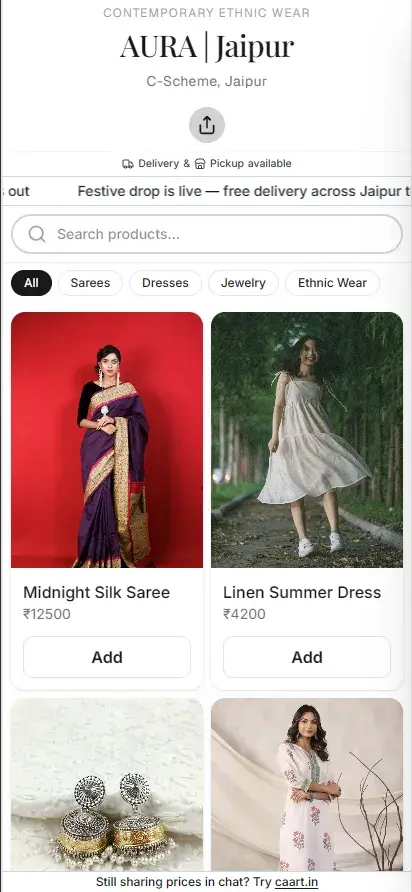
Keep the shopping in one boutique online store
Many boutiques show products on Instagram and take orders over DMs and WhatsApp, collecting sizes, addresses and payment one message at a time. A shop link puts the choosing in one place. The customer picks the piece, size and delivery option, and you receive one complete order on WhatsApp. For the Instagram side, read how small businesses can sell on Instagram.
Common questions about running a boutique online
How do I start an online boutique from home with little money?
Start with the stock you already have, or a small first batch, and sell it to people who already know you. A phone for photos, a WhatsApp Business account, UPI for payments and a shop link are enough to begin. Spend on more stock only once you see which pieces sell, and leave paid ads until orders come in regularly.
How should I handle returns and exchanges?
Decide your rule before your first sale and write it on your shop and in your order confirmation, for example: "Exchange within 3 days for size issues, unworn with tags. No returns on sale or custom pieces." Clear rules prevent most arguments. Ask for a photo or video when a piece arrives damaged, so you can check the claim.
Should I sell on Instagram or on my own website?
Use both, for different jobs. Instagram is where people discover your pieces through reels, posts and stories. A shop link is where they choose a size and place an order without a long DM chat. Put the shop link in your bio and stories, so every post leads to the same place.
Put your collection online
caart's fashion template puts your photos first, with several photos per piece, sizes and colours, and an announcement bar for new drops. Open the boutique demo, read how caart works for boutiques, or create your shop.