
How to make a digital catalogue for your products
Make a digital catalogue customers can browse on their phone, free to start: categories, item names, prices, options and photos, then publish it as a link.
caart team · · Updated · 5 min read
Key points
- A digital catalogue is a list of what you sell that customers open on their phone and that you can update any time.
- Start with a spreadsheet: category, name, price, options, photo.
- Clear names and one photo per item matter more than design.
- Publish it as a link, not a PDF, so it stays current and customers can order from it.
A digital catalogue is the list of what you sell, with photos and prices, that customers open on their phone. For many small businesses it replaces a printed price list, a PDF on WhatsApp, or a folder of product photos sent one by one.
The best catalogues are not the prettiest. They are the ones that are complete, current and easy to order from. Here is how to build one in an afternoon.
Step 1: List everything in a spreadsheet first
Before you open any app, write your range in a simple sheet. It forces you to decide prices and names once, and makes the upload quick.
| Category | Item name | Price (₹) | Options | Photo file |
|---|---|---|---|---|
| Cakes | Chocolate truffle cake | 650 | 500 g / 1 kg, eggless | truffle.jpg |
| Breads | Whole wheat loaf | 70 | loaf.jpg | |
| Hampers | Diwali dry fruit hamper | 1,200 | Small / Large | hamper.jpg |
Use your own items. The prices above are only an example.
Step 2: Group items the way customers look for them
Pick five to eight categories. Customers scan categories first, so use the words they use: "Kurtas", not "Ethnic upper wear". Put your best sellers in the first category.
Step 3: Write names that answer the first question
A good item name tells the customer what it is without opening it. "Cotton kurta, block print, blue" is better than "Item 23". Add one line of description only where it helps the choice, such as fabric, weight or what's included.
Step 4: Use options instead of duplicate items
If a cake comes in two weights, or a kurta in four sizes, make it one item with options. Each option can have its own price. The customer picks one, and the order tells you exactly what they chose.
Step 5: Take simple, consistent photos
You don't need a studio. A phone and a window are enough:
- shoot in daylight, next to a window, without flash
- use the same plain background for every item
- keep the item in the centre and fill most of the frame
- take a second photo for anything people judge by detail, like fabric or jewellery
Step 6: Choose a digital catalogue maker
You can start free. Here are the common options, from simplest to most complete:
| Option | Cost | Good for | Watch out for |
|---|---|---|---|
| PDF or image made in a design app | Free | A printed-style price list | Goes out of date, can't be ordered from |
| WhatsApp Business catalogue | Free | A small range sold in chat | Lives inside WhatsApp |
| An online catalogue or shop link | Free or paid | Customers who browse and order on their own | Check the item limit and monthly fee |
The main question is not design. It is whether you can update it in a minute and whether customers can order from it.
Step 7: Publish your online catalogue as a link, not a PDF
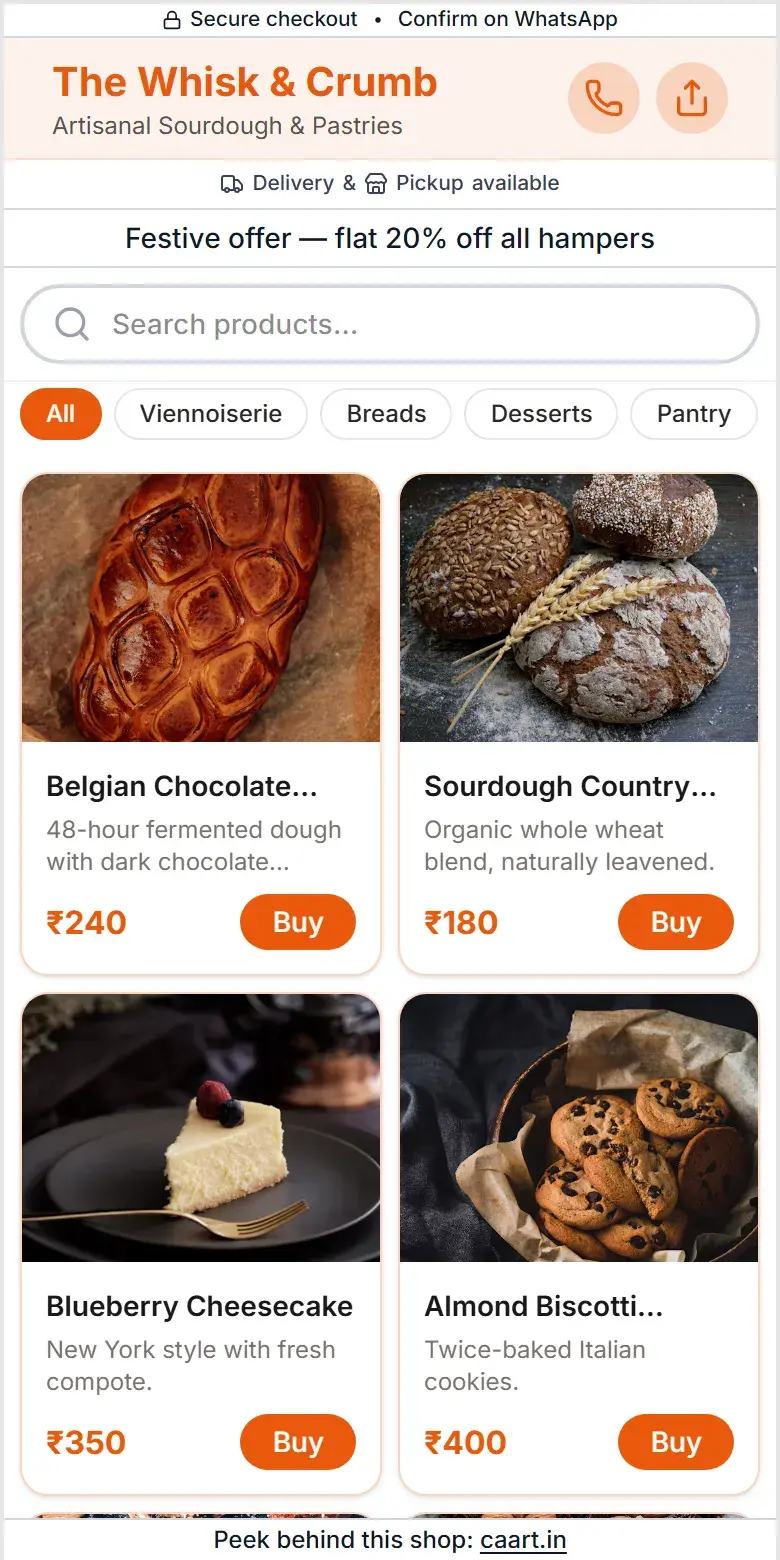
A PDF or image is out of date the moment you change a price, and old copies keep being forwarded. A link always shows the current version. With caart, your catalogue is a shop page at your own address, where customers can add items to a cart and send the order to your WhatsApp.
Step 8: Keep your digital catalogue current
Set a routine. Mark items sold out as soon as they are, and review prices once a month. A catalogue customers trust is one where what they see is what they can buy today.
Common questions about digital catalogues
Can I make a digital catalogue on my phone?
Yes. You can take the photos, write the item list and upload everything from a phone. A laptop helps only if you have a long range to type in. Take all photos in one session, in the same light, so the catalogue looks consistent.
How do I share a digital catalogue on WhatsApp?
If your catalogue is a link, paste it into the chat, your greeting message and your Status, and save it as a quick reply so you can send it in two taps. Avoid sending a PDF: customers can't order from it, and old copies keep being forwarded after your prices change.
How many products should my catalogue have?
There is no minimum. Start with your best sellers and the items customers ask about most, even if that is only ten. A short catalogue that is complete and current works better than a long one with missing prices. Add the rest a few items at a time.
Share it everywhere customers find you
Once it is live, put the link in your WhatsApp greeting, your Instagram bio and on a QR code at your counter. Our guide on sharing your online shop on WhatsApp covers the details.
Build your catalogue on caart
New to selling online? Start with what you need to sell online without an app or website.
caart turns your spreadsheet into a shop page with categories, photos, options and a cart, and sends every order to your WhatsApp. See the demos or create your shop.