
How to take bakery orders on WhatsApp Business
A simple online ordering system for a bakery or home bakery: a menu link, a cake order form for WhatsApp, advance payments and a daily routine.
caart team · · Updated · 6 min read
Key points
- Cake orders go wrong when flavour, weight, message and date are spread across many messages.
- Put your menu, with options like eggless and weight, behind one link.
- Ask for the date, the message on the cake and pickup or delivery in every order.
- Take an advance for custom cakes, and confirm each order with one reply.
Most bakeries already take orders on WhatsApp. Regulars message for bread, a parent asks about a birthday cake, someone wants a box of cookies for Saturday. WhatsApp works well for this, because your customers already use it. The trouble starts when one order becomes ten messages: the flavour in one, the weight in another, the name on the cake in a voice note.
This guide sets up a simple way to take bakery orders on WhatsApp, for a bakery shop or a home bakery. It works with nothing more than WhatsApp Business, and gets easier with an online menu.
What a bakery order form needs
A bakery order has more details than most. Before you change anything, write down what you need for every order. For most bakeries it is this:
| Detail | Example |
|---|---|
| Item and quantity | 1 chocolate truffle cake |
| Weight or size | 1 kg |
| Options | Eggless, less sugar |
| Message on the cake | "Happy Birthday Riya" |
| Date and time | Saturday, 5 pm |
| Pickup or delivery | Delivery, with address and PIN code |
| Name and phone | So you can confirm and find the order later |
If any of these is missing, you have to ask, and the customer may not reply until it is too late to bake.
Step 1: Put your bakery menu online, behind one link
Many bakeries send a photo of a printed menu. It goes out of date the moment a price changes, and old copies keep circulating.
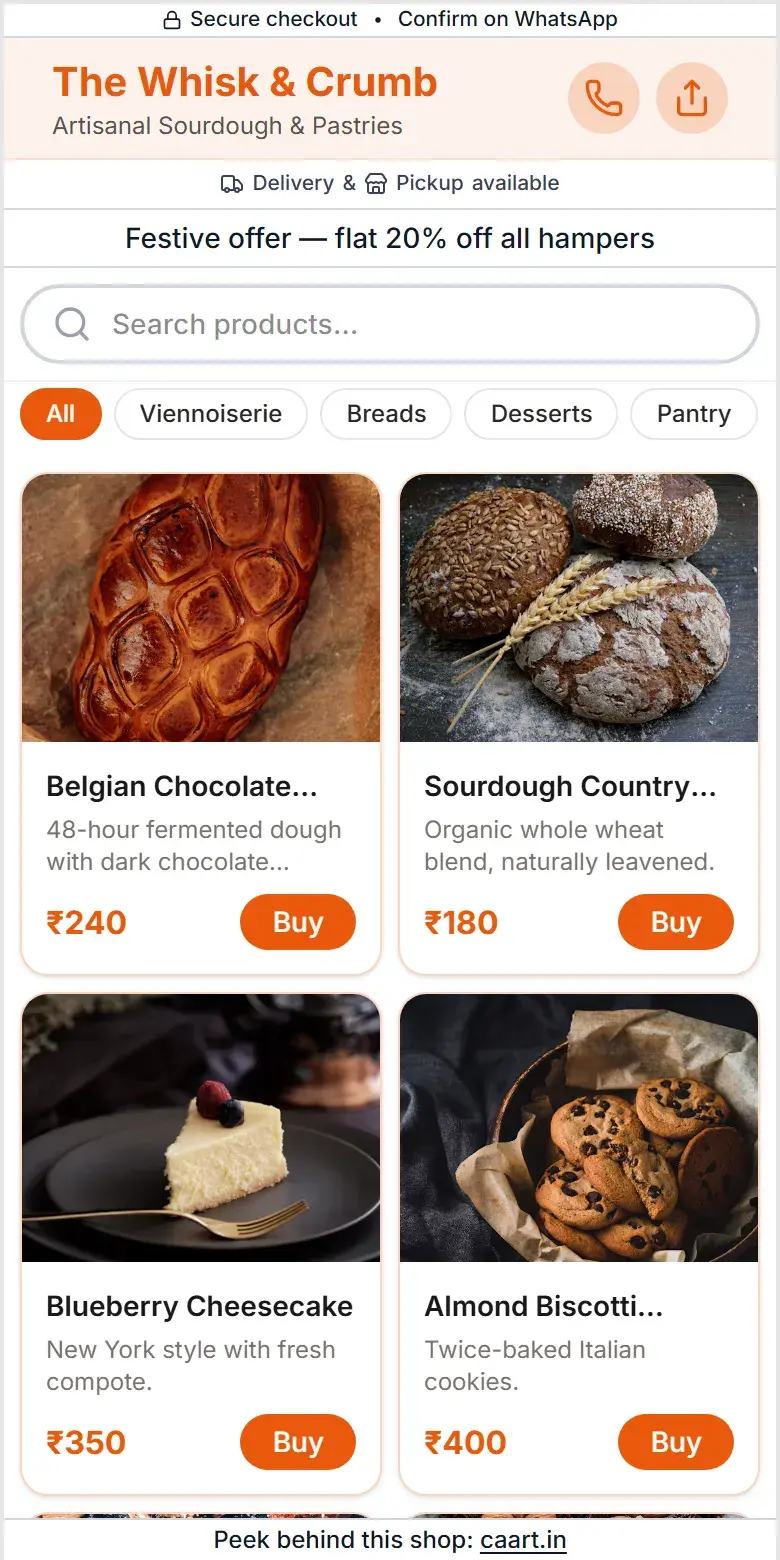
A menu link fixes this. You update it once, and everyone who opens it sees today's items and prices. Organise it the way customers think:
- Categories: breads, cakes, pastries, cookies, festive hampers.
- Photos for anything people choose by looks, especially cakes.
- Options with their own price, such as 500 g and 1 kg, or eggless.
- Sold out marked clearly, so nobody orders the last of the croissants at 6 pm.
Step 2: Use one cake order format on WhatsApp
Put the details from the table above into your WhatsApp Business greeting message, so new customers see them before they start typing. For example:
Thanks for messaging! To order, send: items and weight, eggless or not, message on the cake, date and time, pickup or delivery (with address and PIN code), and your name.
If your menu is a caart shop, the customer picks the item and options, chooses pickup or delivery, and writes the date and cake message in the order note. The order reaches your WhatsApp as one message with everything in it.
Put a QR code for the menu on your counter and cake boxes, so regulars can reorder without asking. See how to create a QR code menu.
Step 3: Take an advance for custom cakes
Custom and large cakes cost you ingredients and time before the customer collects them. Many bakeries ask for part of the price in advance for these orders and the rest at pickup. Decide your rule, write it in your greeting message, and apply it to everyone.
UPI is the usual way to collect an advance. We cover the details in how to accept UPI payments for WhatsApp orders.
Step 4: Confirm every order with one reply
Reply with the full order, the total, the advance if any, and when it will be ready:
Confirmed: 1 kg chocolate truffle, eggless, "Happy Birthday Riya". Ready Saturday 5 pm for pickup. Total ₹, advance ₹ by UPI.
The customer can correct a mistake straight away, and you both have the same record in the chat.
Step 5: Use labels to plan the day
WhatsApp Business lets you label chats. A bakery can work with three: New order, Advance paid and Ready. Each morning, open Advance paid to see what you need to bake today. Anything still under New order at closing time has not been answered.
Bake for regulars, keep the commission
Delivery apps are useful for reaching new customers. For the regulars who already message you, a direct link means the order, and the full price, comes to you. You can compare food delivery apps with your own shop to see where each one fits.
Get found by new customers too
Regulars order from your link. New customers usually find a bakery on Google Maps. Our guide on getting your business on Google Search and Maps covers the free steps.
Common questions about bakery orders
Do I need an FSSAI licence for a home bakery?
Yes. Anyone who sells food in India, including a home baker, needs FSSAI registration or a licence. Small businesses usually need only the basic registration, which you can apply for online on the FSSAI FoSCoS portal. Larger turnovers need a state or central licence. Check the current limits and fees on the portal, and show your FSSAI number on your menu and boxes.
How much advance should I take for a cake order?
There is no fixed rule. Many bakeries ask for about half the price for custom or large cakes, and the full amount for orders that can't be resold, such as a cake with a name or photo on it. Pick one rule, write it in your greeting message and apply it to every customer.
How early should customers order a custom cake?
Set a cut-off that gives you time to buy ingredients and bake without rushing, for example 24 hours for regular cakes and two or three days for tiered or theme cakes. Write it on your menu and greeting message, and confirm the date and time in your reply, so there is no confusion at pickup.
Try it with your own menu
caart gives your bakery a menu link with photos, options like eggless and weight, an offer banner for festive hampers, and pickup or delivery at checkout. Orders arrive on your WhatsApp as one message.
Open the bakery demo, read how caart works for bakeries, or create your shop.