
WhatsApp Business catalogue vs your own online shop
The WhatsApp Business catalogue limit, how to share its link, and when your own online shop works better. Plus how to use both without confusing customers.
caart team · · Updated · 5 min read
Key points
- The WhatsApp Business catalogue is free, holds up to 500 items and lives inside WhatsApp.
- Your own shop is a web link: it opens in any browser, has a cart, and asks for delivery details.
- The catalogue suits a small range and customers who already chat with you.
- A shop link suits Instagram, Google and posters, and orders that need a complete format.
If you sell on WhatsApp, the WhatsApp Business catalogue is the obvious first step. It costs nothing and your customers never leave the chat. At some point many owners ask whether they need a proper online shop as well. This post covers the catalogue's limits, how to share it, and how to decide, based on how you actually sell.
WhatsApp Business catalogue limit and cost
According to the WhatsApp Help Center, the catalogue is free with the WhatsApp Business app and can hold up to 500 products or services, each with photos, a price and a description. Customers browse it inside WhatsApp.
How to share your WhatsApp catalogue link
In the WhatsApp Business app, open Catalog Manager and tap the option to share a link. You can paste that link in chats, on Instagram or in a status. It opens the catalogue in WhatsApp.
When the catalogue works best
It works best when:
- you have a small range that changes slowly
- almost every customer already has your number and chats with you
- you are happy to work out delivery, address and total in the chat
Where a catalogue starts to strain
The catalogue shows products. It doesn't run the order for you. A few things come up as you grow:
- Details arrive in pieces. The customer picks items, then you still ask for size, address, PIN code and pickup or delivery.
- It lives in WhatsApp. People who find you on Instagram or Google expect a web page they can open first.
- Every shop looks the same. The catalogue uses WhatsApp's layout, not your brand.
None of these is a problem for a small seller. They become one when you spend more time collecting order details than packing orders.
What your own online shop adds
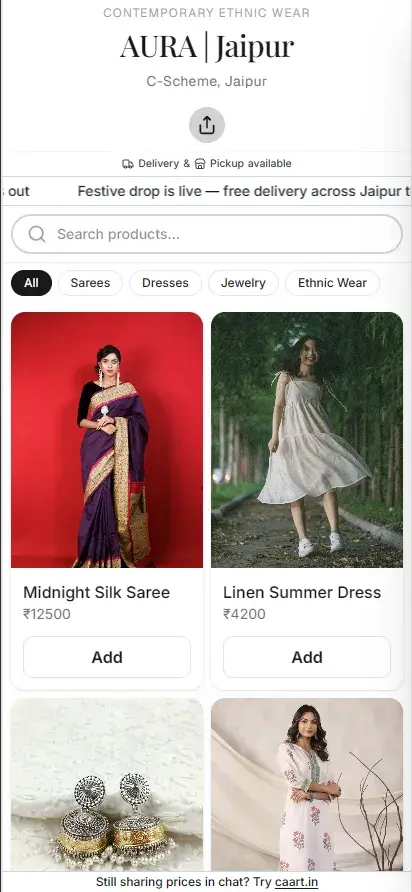
An online shop is a web page with your products, a cart and a checkout. With caart, the checkout ends on WhatsApp: the customer taps send, and you receive one message with the items, quantities, total, name, phone, and the address or pickup choice.
That gives you:
- One link for everywhere: Instagram bio, Google Business Profile, WhatsApp status and a QR code on your counter.
- Complete orders: delivery or pickup, address and PIN code are asked before the order is sent.
- Your own look: a template for food, fashion or services, with your logo and colour.
A quick way to decide
| If this sounds like you | Start with |
|---|---|
| Fewer than a few dozen items, all regulars | WhatsApp catalogue |
| You don't want to pay for anything yet | WhatsApp catalogue |
| You need more items than your shop plan allows | WhatsApp catalogue |
| Customers find you on Instagram or Google | Your own shop link |
| You lose time asking for addresses and sizes | Your own shop link |
| You want posters and a QR code that open a menu | Your own shop link |
Using both without confusing customers
You don't have to choose one forever. Many shops keep the catalogue for quick replies in chat and use their shop link everywhere else. Two rules keep it simple:
- Keep prices the same in both. Update the shop first, then the catalogue.
- Point new customers to one place. Put your shop link in your greeting message, so first-time buyers get the full menu and checkout. A QR code menu at your counter can open the same link.
For a side-by-side table of features, see caart vs the WhatsApp Business catalogue. If you are only starting out, read how to start selling online without building an app or website.
Common questions about the WhatsApp catalogue
Can customers order from a WhatsApp catalogue?
Yes. Customers can add catalogue items to a cart inside WhatsApp and send it to you as a message. The cart lists items and quantities, but it doesn't ask for an address, PIN code or pickup or delivery, so you still collect those details in the chat.
Do I need the WhatsApp Business app to make a catalogue?
Yes. The catalogue is part of the WhatsApp Business app, not regular WhatsApp. You can move your current number to the Business app and keep your chats, but the number then stops working in regular WhatsApp.
Can I add products to the catalogue without a price?
Yes. Price is optional for catalogue items, which suits made-to-order work. Still, add a price or a starting price where you can. Customers who can't see a price often ask and then don't buy, and every question is another message for you to answer.
See the difference on your phone
Open a demo shop on your phone and compare it with your catalogue. If the shop link fits how you sell, you can create your own and start sharing it today. caart is an independent product and is not affiliated with WhatsApp or Meta.